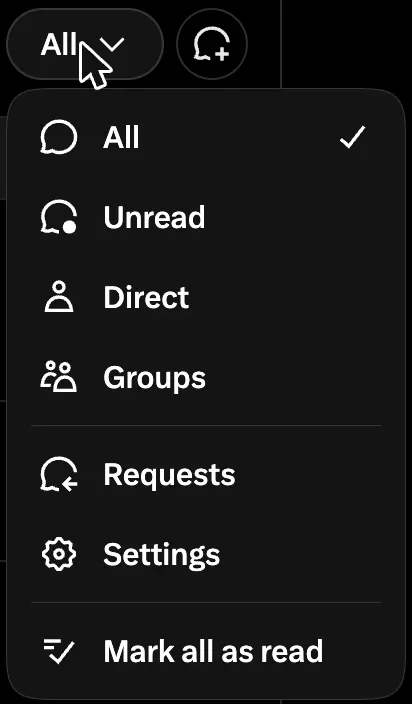
Message requests on X are in Chat, under Requests. On x.com that option hides in the All menu at the top of the Chat list. Requests come in two tabs: x.com calls them Message Requests and Other, and the apps call them Priority and Hidden. If there is no Requests at all, your DMs are closed to strangers.
A message request is a DM from someone you do not follow, so it waits outside your main inbox until you accept it.
How to see message requests on X
On x.com, open Chat, tap the All menu at the top of the list, and pick Requests. In the iPhone and Android apps, open Messages and tap Requests at the top of the screen. The x.com menu is easy to miss, so here is what it looks like:
Inside a request you get two buttons, Accept and Delete. Photos, videos and link previews stay hidden until you accept, and the sender cannot tell that you opened it.
What "may be spam or lower priority" means
That grey line sits at the top of the second tab, where X's AI model Grok files the requests it ranks lower. X's Chat help page says Grok helps sort every request into Priority or Hidden. When we opened it on 10 September 2026, it looked like this:
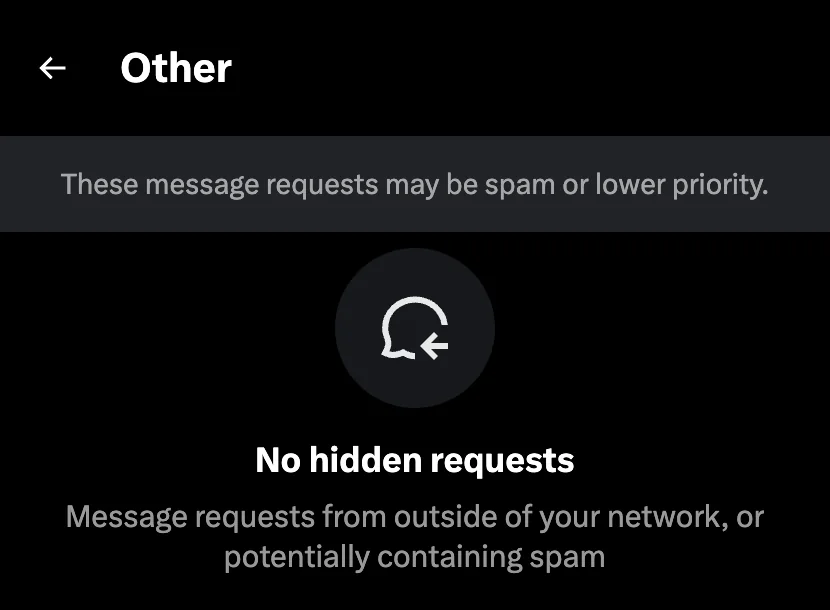
X does not say what Grok looks at. The one rule it does publish is that graphic media from a stranger is treated "like spam". So if someone says they wrote to you and you never saw it, check this tab before anything else.
Why message requests are missing
If Requests does not show at all, your DMs are closed to people you do not follow, because the apps only show the folder when you take messages from strangers. On x.com you get a banner that reads "You can't receive new message requests. Change Settings."
If the folder is there but one request is not, one of these usually explains it:
- It was accepted or deleted. Accept moves the chat into your inbox, and Delete removes it.
- The quality filter hid it. In the apps, a filter that is on by default tucks low quality requests at the bottom, with no alert.
- The sender used your X Number. Chats sent with your private X Number skip Requests and land in your inbox.
- Requests will not load. X names no cause, so update the app or try x.com.
How to open your DMs to everyone
One setting decides who can send you a request. Open Settings and privacy (under More on x.com, or from your profile picture in the apps), then Privacy and safety, then Direct Messages. Under Allow message requests from, x.com offers three choices:
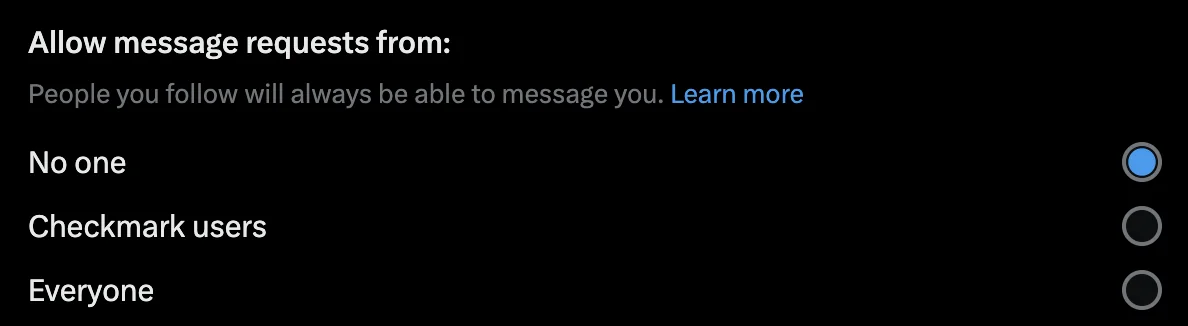
Everyone lets anyone send a request, which suits a business that wants to hear from strangers. Checkmark users only lets accounts with a blue check start a chat. No one shuts out everyone you do not follow unless they have your X Number, and chats you already have stay open.
The apps word the same switch differently: iPhone says Allow messages requests from everyone, and Android says Receive messages from anyone.
If you are the one sending
Your own first message to a stranger is a request too, so it lands in one of their two tabs. X does not publish what pushes a request into Hidden. How to keep a cold DM out of Hidden requests covers what a sender can control.
If the person's inbox is closed instead, your message never becomes a request at all. What "inbox closed" means on X explains that screen.
If you send to a whole list, Xsender is one of eight tools in this roundup of DM tools, with the price of each.
FAQ
Can I turn message requests off on X?
Yes. Set "Allow message requests from" to No one. Then only people you follow, or people with your X Number, can start a new chat.
Does the sender know I read their message request?
No, X sends no read receipt until you accept a request. Deleting a request tells the sender nothing either, but it does not stop them writing again, so block them if you need to.
Can you delete message requests in bulk?
X's help pages describe no bulk delete for message requests. Look through the Hidden tab before you clear it, since real people land there too, then work through Priority by hand.
Do message requests expire?
X's help pages describe no expiry, so a message request waits until you accept or delete it. If one is missing, check the Hidden tab and the quality filter.
Try it on your own X accounts. See plans and the 7-day trial
Sources and method
Sources and dates
- Setting names, Accept and Delete, read receipts, graphic media and the quality filter: X's DM help page, archived 6 September 2026.
- The Grok sort: X's Chat help page, archived 4 August 2026, live 10 September 2026. X Numbers: the same page, archived 4 October 2026.
- The x.com screens and banner: read live 10 September 2026, in English. App wording comes from X's help page; we did not check the apps by hand.